

Short answer: A new site, or a site newly added to Search Console, can take up to a week to show data. Google says data should begin appearing within a few days. For an established property, new data normally arrives within 2 to 3 days. The Performance report’s “24 hours” view can show data with a delay of only a few hours.
When does Search Console start collecting data?
Search Console starts collecting data as soon as someone adds the property to their account. Collection can begin before the property is verified, and it continues as long as at least one user has the property in their account. Verification is needed to access the data, but verifying late does not mean you lose the data collected in the meantime.
How long until you see data?
| Situation | What to expect |
|---|---|
| New site, or site newly added to Search Console | Up to a week for data to be generated |
| After adding a property | Data should begin to appear in a few days |
| Normal delay on an existing property | Collected data is normally available in 2 to 3 days |
| Performance report, “24 hours” view | Data with a delay of only a few hours |
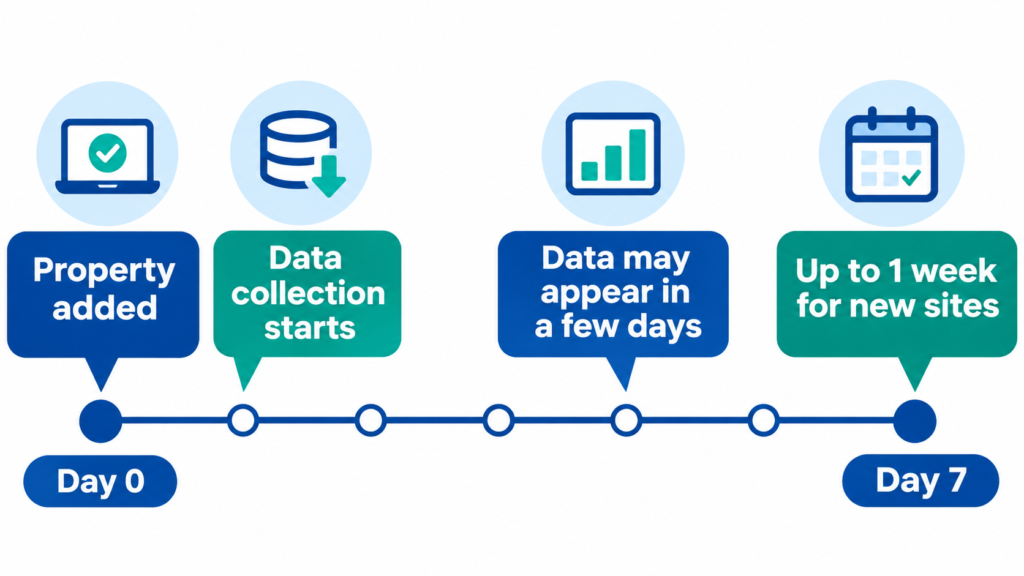
If you have just added a new site, give it about a week before assuming something is wrong.
Why a new site shows nothing at first
Search Console can only report on activity Google has already seen. If your site is new, Google may not have discovered it yet. Google’s Page indexing help explains that new content can take a few days to be indexed and that crawling and indexing are not immediate.
There may also be no impressions or clicks to report if nobody has seen your site in Google Search results yet.
Different reports update at different speeds
Search Console reports do not all update at the same time:
- Performance report: Shows clicks, impressions and average position. It is usually the fastest report.
- Page indexing report: Shows which pages Google has indexed and why others are not indexed. It can lag behind the Performance report. Find it under Indexing → Pages.
- URL Inspection tool: Shows details about one specific URL.
Use the “24 hours” view for fresh data
Google introduced the “24 hours” view to the Performance reports in December 2024. It shows data from the latest available 24 hours, usually with a delay of only a few hours. Google says the data is shown in your local time zone.
To open it:
- Open Google Search Console and select your property.
- Open the Performance report.
- Select the 24 hours view.
This view only has data for pages that are already indexed and receiving impressions.
What to do if there is still no data after a week
Google points to two common reasons:
1. The property URL or protocol is wrong. For example, you may have added http://example.com when your site uses https://example.com. A URL-prefix property only covers URLs that begin with the exact prefix you entered. The http and https versions differ, as do www and non-www.
2. Your site has not received clicks from Google Search yet. If nobody has clicked through from search results, the Performance report may have no data to show.
Check your property type
Search Console has two website property types:
Domain property: Covers all subdomains and both HTTP and HTTPS versions. It requires DNS record verification. Do not include www when creating it.
URL-prefix property: Covers only URLs that start with the exact prefix you enter. It can be verified in several ways.
If you are unsure which to choose, a Domain property can help avoid HTTP/HTTPS and www/non-www mix-ups.
Help Google find your site
For a new website, Google recommends requesting indexing of your homepage as a first step:
- Open the URL Inspection tool in Search Console.
- Enter your homepage URL.
- Select Request indexing.
Google says requesting indexing can reduce the indexing lag. You can also submit a sitemap to tell Google about your pages.
Sometimes the delay is on Google’s side
Reporting delays can also happen on Google’s end. In October 2026, Search Engine Roundtable reported that the Performance report was more than 64 hours behind in October 2026, calling it unusual for that report. Search Engine Land reported in 2025 that the Page indexing report had once fallen almost a month behind, with a notice shown at the top of the report.
If you suspect a reporting delay, check the report’s “Last updated” date and wait for Google to resolve it. A reporting delay does not change your site’s crawling or indexing. For an important page, you can also check its status with URL Inspection.
Why Search Console numbers can differ from other tools
Search Console and Google Analytics may show different numbers. Google lists several reasons:
- Search Console may cover only a subset of your URLs.
- It removes duplicate data and visits from robots.
- Some analytics tools track only users with JavaScript enabled.
- The Performance report omits some rare queries to protect user privacy.
- The Performance report assigns data to days using California time.
Because the tools collect and process data differently, their numbers rarely match exactly.
What to remember
- Adding a property starts data collection; verification gives you access.
- New sites can take up to a week to show data.
- A wrong URL, protocol or property type is a common reason for an empty report.
- Different Search Console reports update at different speeds.
- A late report is not, by itself, a reason to change your site settings.
The takeaway
Give a new Search Console property about a week to populate. If it is still empty, check that you added the correct property type and URL, then request indexing for your homepage.
Sources
- About Search Console data — Search Console Help
- Add a website or platform property to Search Console — Search Console Help
- Page indexing report — Search Console Help
- An improved way to view your recent performance data in Search Console — Google Search Central Blog
- Google Search Console Performance Report Delayed — Search Engine Roundtable
- Google fixes weeks-long Search Console Performance report delay — Search Engine Land